Adli BilişimSiber Güvenlik
Web Siteleri Üzerinde SSL/TLS Check
What Is SSL? SSL is short for Secure Sockets Layer and provides security at the socket level. SSL certificates are a concept most of us are familiar…

Mehmet Kadir CIRIK
Hello everyone :)
What Is SSL?
- SSL is short for Secure Sockets Layer, and it provides security at the Socket level.
- SSL certificates are a concept most of us are familiar with. These certificates protect the information people enter on your website by encrypting it using encryption algorithms.
- For example, say you have an SSL certificate and a website. The SSL certificate encrypts, behind the scenes, the personal data of visitors who subscribe to your website’s newsletter or the credit card information of customers who shop on your site, preventing it from falling into the hands of third parties.
- SSL is a type of digital security technology that enables encrypted communication between a website and a web browser. The use of this technology has greatly declined today and has been almost entirely replaced by TLS.
How Does SSL Work?
- SSL establishes a secure, encrypted connection between the visitor’s web browser and the web server.
- This process of establishing a secure session happens behind the scenes and takes place in a very short period of time. This way, the visitor experiences no interruption while shopping or browsing the site.
- Going step by step: when someone visits your website, a secure connection request is made first. If this website has an SSL certificate following the secure connection request, the certificate’s validity is confirmed by a third party (for example, if you’re using X’s SSL certificate, then the third party is X), and the encryption process begins.
What Is TLS?
- TLS, Transport Layer Security, was likewise developed by Netscape and is considered more advanced and more secure than SSL.
- TLS is used to enable secure data transfer between applications that communicate with each other.
- Like SSL, it provides data confidentiality; since SSL is no longer used, people now use the term TLS instead.
- TLS is used in instant messaging software, file transfers, VPN connections, and many other places.
HTTPS
- “https” is the secure extension of “http”. It’s the protocol used by websites with a TLS/SSL certificate installed to establish a secure connection with the server. This protocol runs on port 443 and is known as the SSL port.
- In other words, if a website’s URL is “https”, this website has an SSL certificate. And whether the padlock icon at the beginning of the URL is open or closed can also tell you whether an SSL certificate is present or not.
Differences Between TLS and SSL
- First, one of the most notable differences is that SSL provides security at the socket level, so if a security vulnerability is detected in the system, it ends up affecting most of the system. TLS, on the other hand, provides security at the transport layer, catching and mitigating any issue earlier.
- TLS is the more advanced version of SSL. TLS emerged as a result of specific improvements made to SSL.
- Since SSL had a large number of security vulnerabilities, TLS was developed to make it more secure.
- The first version of SSL is SSL 1.0.
Afterward, SSL 2.0 was released, but since it had too many security vulnerabilities, 3.0 was developed. TLS 1.0 was developed in 1999, and this version was followed by TLS 1.1, 1.2, and 1.3. Today, TLS is used far more widely.
What Is an SSL Cipher?
- An SSL cipher, or an SSL cipher suite, is a set of algorithms that helps establish a secure connection between two entities.
- It generally defines the method by which a secure connection between the client and server takes place.
- The purpose here is to conceal any information that could be obtained through network eavesdropping.
The POODLE Vulnerability
- This is a vulnerability numbered CVE-2014-3566. Aside from being very well known, it genuinely affected a huge number of people and organizations.
- It allows encrypted communication over SSL 3.0 to be eavesdropped on.
- Its logic works roughly as follows;
- First, the network is monitored by the attacker,
- Then an attempt is made to break the server-client connection, forcing the use of SSL 3.0. The goal here is to exploit a previously discovered security vulnerability in SSL 3.0.
- Then the POODLE attack is carried out.
- This vulnerability necessarily relies on a downgrade attack. In other words, it involves exploiting a vulnerability in any of the SSL or TLS versions supported by the website in order to force a fallback to an insecure version.
TLS 1.3 Encryption Techniques
- The list of SSL cipher suites shrank considerably going from TLS 1.2 to TLS 1.3. Now, only five SSL cipher suites are recommended. These are;
- TLS_AES_256_GCM_SHA384
- TLS_CHACHA20_POLY1305_SHA256
- TLS_AES_128_GCM_SHA256
- TLS_AES_128_CCM_8_SHA256
- TLS_AES_128_CCM_SHA256
SSL/TLS Check
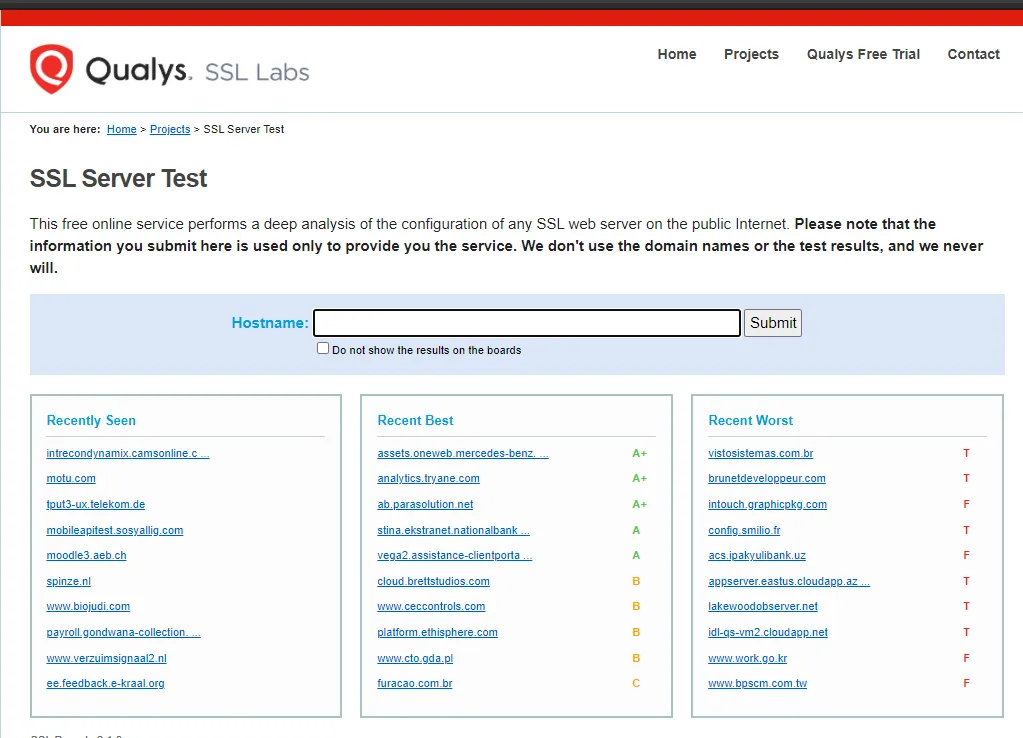
First, a tool or a checking environment can be used to check a website’s SSL/TLS configuration. Here, I’ll use the website shown below to gather information about the SSL/TLS certificate on my own website.
- The interface is very simple, as shown below. It shows the most recently searched websites and insecure websites. We type kadircirik.com into the hostname field.
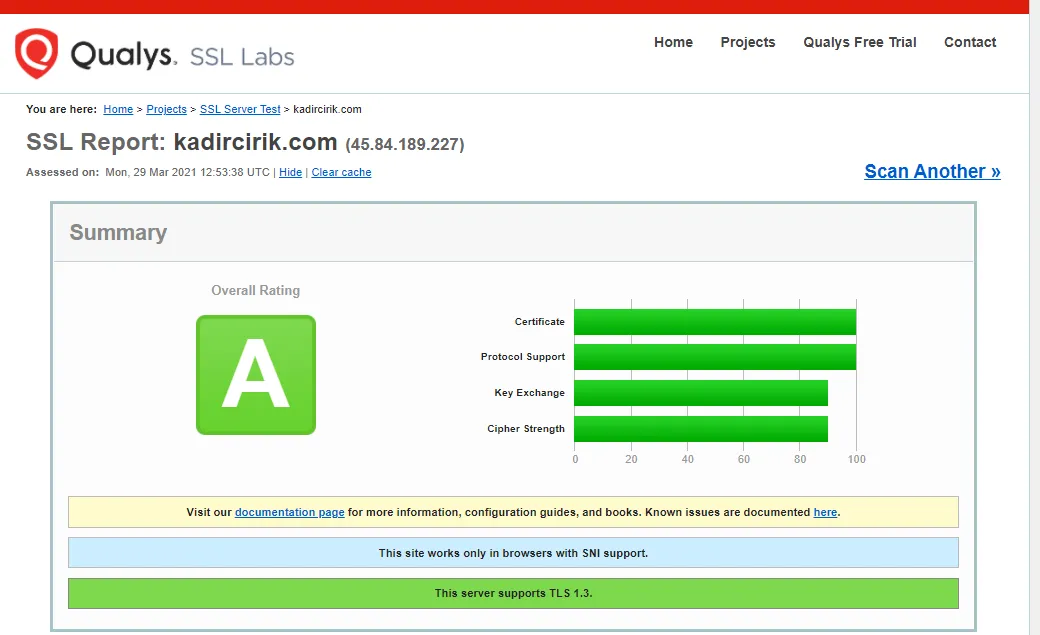
- In this section, our website’s Certificate, Protocol Support, Key Exchange, and Cipher Strength have been rated out of 100.
- Another important point here is that our web server supports TLS 1.3.
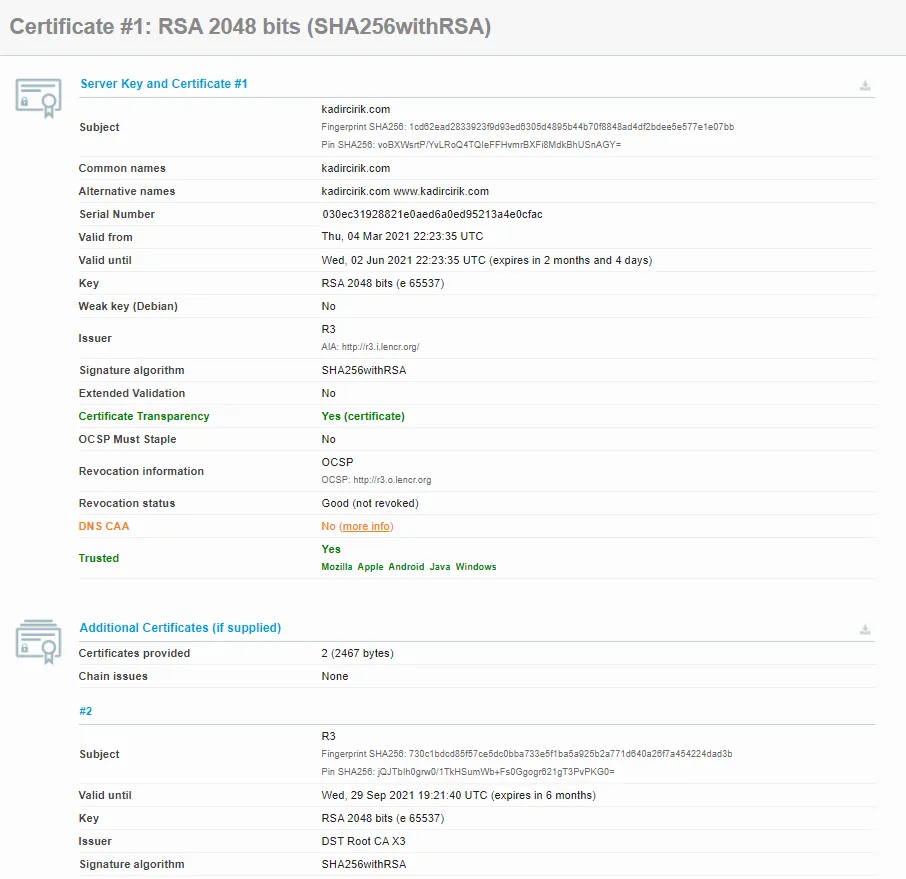
- Section 3 covers a number of properties related to the key, whether weak keying is present, and which signature algorithms are used. You can examine and try these out yourself in detail.
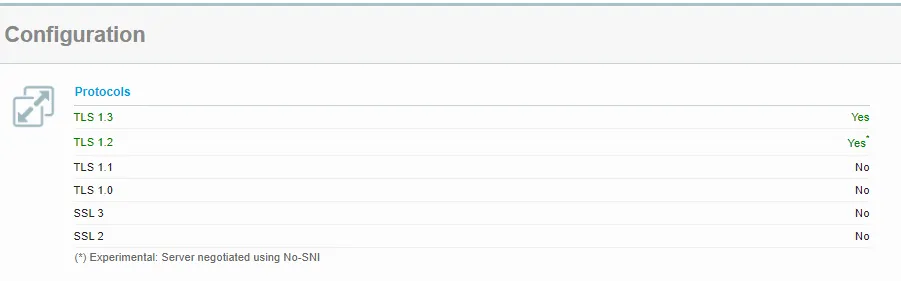
- Another important point here is that a website can support multiple SSL/TLS versions at the same time. Looking at the right side, you can see that my site supports both TLS 1.2 and TLS 1.3.
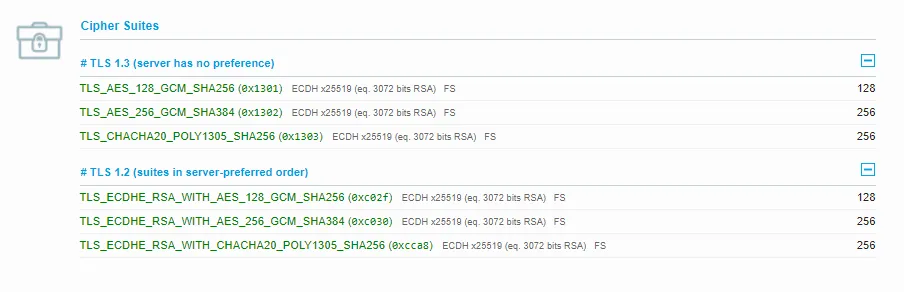
- Here, the top section shows which cipher suites are used to encrypt data for each supported SSL/TLS version.
Thank you for reading this far. :)