Domain, Domain Controller, Active Directory, Group Policy Concepts and Their Relationships
With this article, I'm starting a new series titled " Windows Server and System Administration ", based on what I've recently researched and a training I took.…

Hello everyone. :) With this article, based on what I’ve recently researched and a training I took, I’m starting a new series under the title “Windows Server and System Administration”. Ultimately, I want to share with you what I’ve learned about Windows Server and System Administration.
In this article, I want to touch on the following topics in order, without going into too much detail, just to help you grasp the concepts:
- Domain,
- Domain Controller(DC),
- Active Directory,
- Group Policy
Let’s get started now. :)
1-Domain
A domain is a realm that currently exists or is about to be created. In other words, it’s a realm created to bring small, medium, or large-scale networks together under a single roof so that management can be centralized. Each of these realms has a name and an administrator. And as you’ll see in the image below, it can also have its own sub-domains. A domain consists of two parts: a name and an extension.
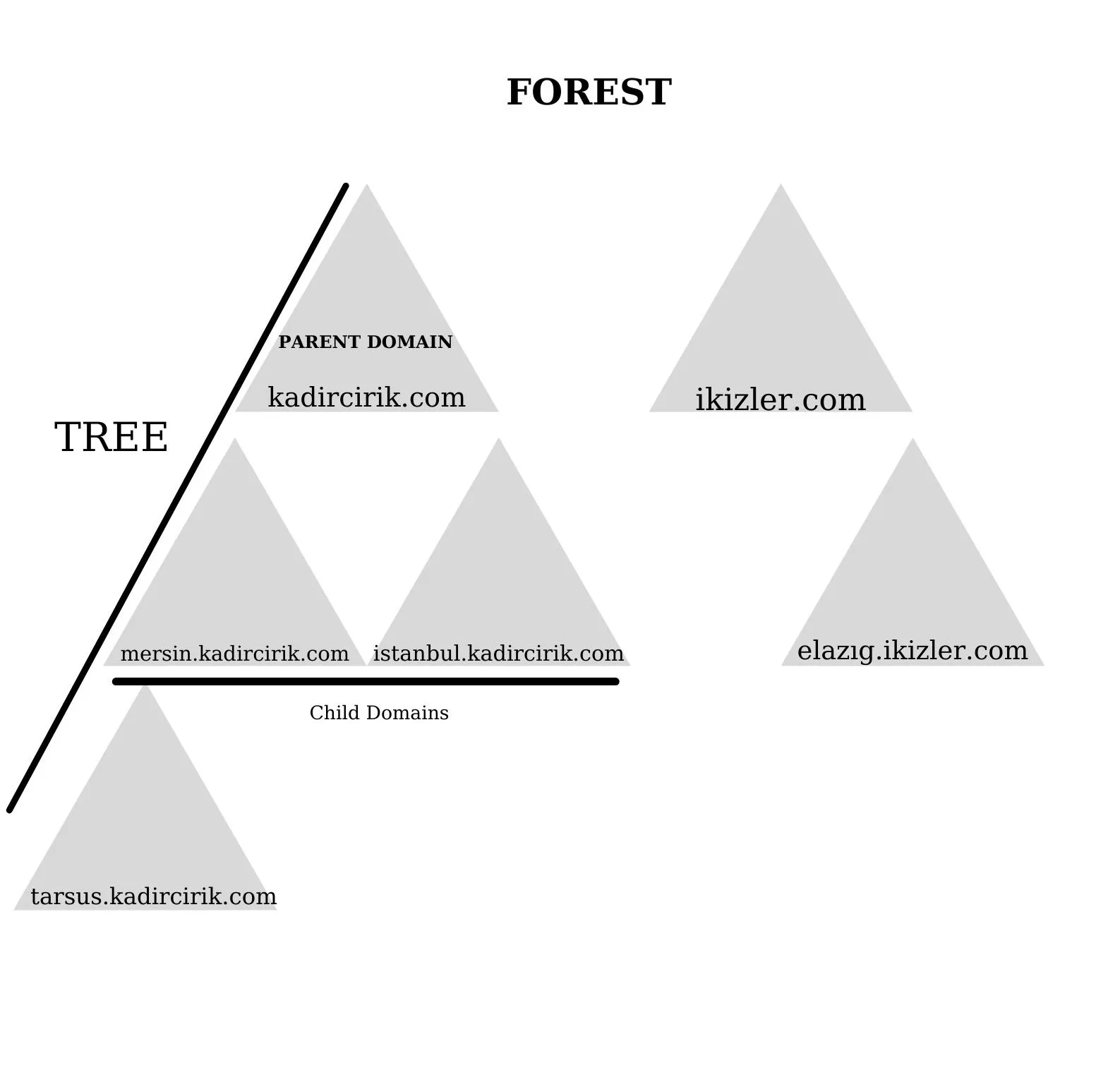
In the image below, we’ve defined kadircirik.com as the Parent domain. Under this domain, I’ve shown the sub-domains belonging to kadircirik.com that are located in different locations.
Child Domain:
Creating a sub-domain while keeping the root domain name is called a “Child Domain”.
In the example I gave in the image above, our root domain is kadircirik.com. Let’s say this domain is located in Ankara. It also has different branches in Mersin and Istanbul. To meet different needs and respond to them quickly, sub-domains were set up for Mersin and Istanbul while preserving the root domain. These sub-domains are called “Child Domain”.
Parent Domain:
The main domain that a child domain is connected to is called the “Parent Domain”. Also, if there are sub-domains connected to a child domain, that child domain can itself be the Parent Domain for the domains beneath it.
Tree and Forest:
The Windows Server Domain we’ve already created is the root domain in Active Directory. In addition, the domains created will form the Tree and Forest structure of the directory.
Tree:
A Tree can be defined as a collection of one or more domains that allow resources to be shared. As seen in the image above, domain connections that branch out in a hierarchical, tree-like structure are called the Tree structure.
Forest:
It’s formed as a result of the merging of two different domains. In other words, it involves combining the domains of two different companies.
Let’s say holding companies X and Y merged their systems so they could communicate with each other. As a result, they can share resources between themselves. This structure is called the “Forest” structure.
2- Domain Controller(DC)
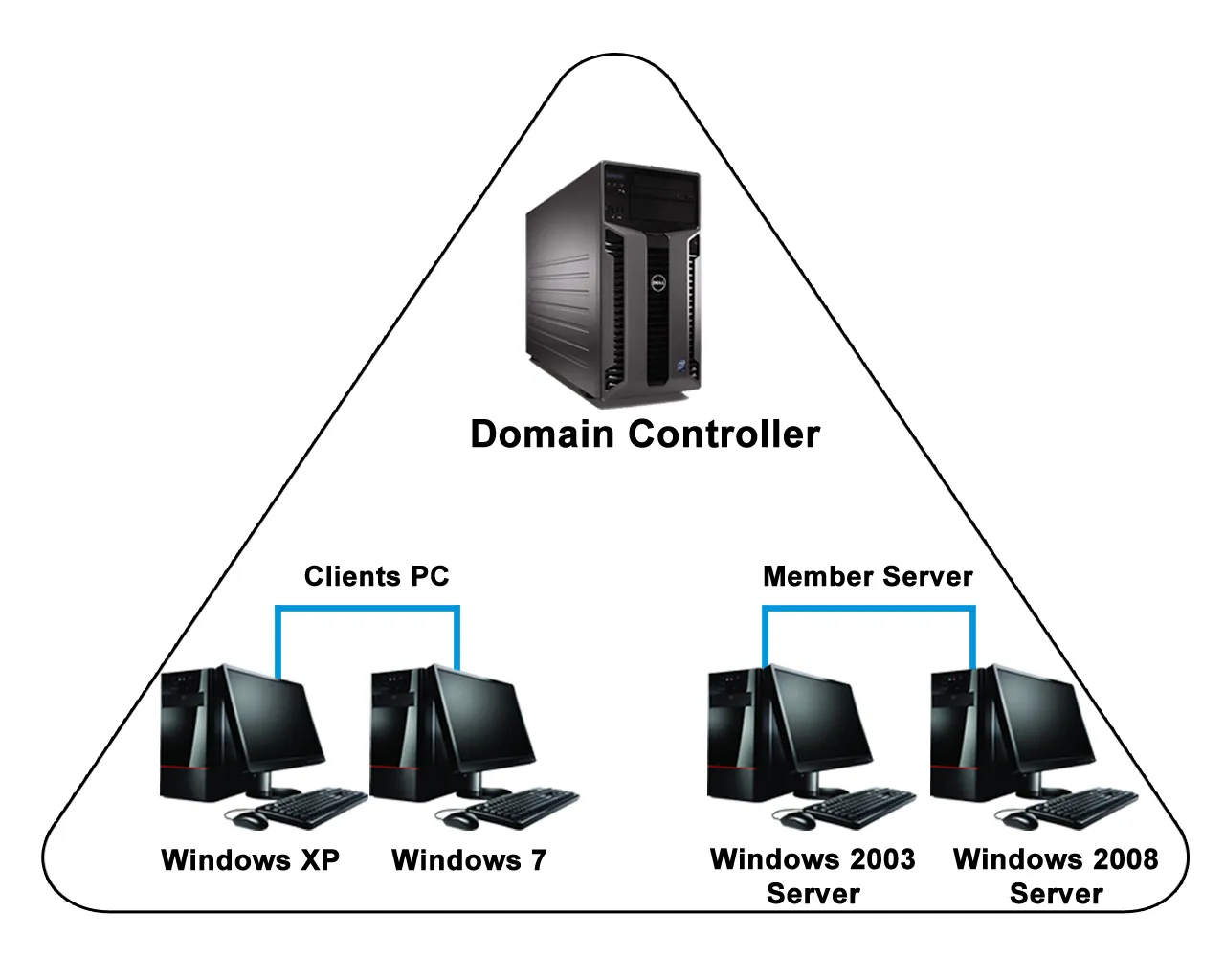
A Domain Controller is the machine that manages everything within the entire domain structure described above. Every domain has at least one Domain Controller. The reason I say “at least one” is that, in general, every domain has 2 Domain Controllers. This is so that if any failure occurs on one DC, the other one can take over.
- One of its most important tasks is to authenticate users when they log on to the domain.
- For a machine to become a DC, it must have the Windows Server operating system installed on it.
- And the Domain Controller role must be installed on it.
- A domain can have more than one DC, but the system is managed through a single domain. And all information is shared with the other DCs.
- All machines can be managed within the framework of the rules written on the DC. When we want to assign restrictions to a user or users, we can carry out this entire process on the DC.
- For example, if a rule is written on the Domain Controller stating that no machine can be used after midnight, then no machine can be used.
3-Active Directory(AD)
We mentioned that Domain Controllers, or DCs, manage the entire Domain. The tool that the DC uses to manage this Domain is called Active Directory.
Active Directory isn’t just for creating users, nor does it only manage users. It also manages users, groups, computers, printers, file shares, and much more. All of these are called Active Directory objects.
Large Domains can have hundreds or even thousands of computers and groups, or other objects. To keep all of these more organized, there are Organizational Units (OU)s. In fact, these can also be called Active Directory folders.
For example, just as we create folders on our computers and organize data into them, in Active Directory we create OUs and put the objects we want inside them to keep things organized.
- Schema Master: Determines the attributes that objects within the structure will have.
- RID Master: There are many objects on the network. Each of these objects has its own unique SID number. It’s the RID Master that provides this SID number. This way, conflicts are prevented.
- LDAP(Lightweight Directory Access Protocol): Used to perform queries and updates on Active Directory. With the LDAP protocol, we can redefine Active Directory objects using Organizational Units.
4-Group Policy(GP)
This is another tool used to manage the Domain Controller. It’s found within Active Directory. Restrictions are assigned from here to all users, computers, groups, and Organizational Units in the domain. All assigned restrictions appear as Group Policy objects in the Group Policy management console.
Some of these restrictions can include:
- For example, setting specific wallpapers for specific computers,
- Preventing certain users from accessing certain sites,
- Allowing certain groups to log on to their computers only at certain times, and similar restrictions can be assigned.
These examples can be expanded as you see fit. For now, understanding the underlying logic will be enough.