DeepBlueCLI: Powershell Modülü ile Threat Hunting
Bu makalemde sizlere Eric Conrad 'ın geliştirmiş olduğu DeepBlueCLI modülünü kullanarak Tehdit Avcılığı uygulaması yapacağım. DeepBlueCLI , Windows'ta (PowerShell…

Hepinize selamlar. :)
Bu makalemde sizlere Eric Conrad’ın geliştirmiş olduğu DeepBlueCLI modülünü kullanarak Tehdit Avcılığı uygulaması yapacağım.
DeepBlueCLI , Windows’ta (PowerShell modülü) veya ELK’da (Elasticsearch) Windows olay günlüklerini otomatik olarak ayrıştırmak ve Windows Olay Günlükleri aracılığıyla Tehdit Avcılığı yapabilmek için kullanılan bir PowerShell modülüdür.
İlk olarak sistemimizde terminal açarak başlıyoruz. Ardından DeepBlueCLI modülümüzün olduğu konuma gidiyoruz.
C:\tools>cd \tools\DeepBlueCLI-masterDeepBlueCLI bir Powershell modülüdür, bu nedenle ilk olarak bu modülü başlatmamız gerekiyor. Bunun için de aşağıdaki komutu kullanıyoruz.
C:\tools\DeepBlueCLI-master>powershellBu aracı, herhangi bir güvenlik duvarı ya da antivirüs engeli olmadan çalıştırmak için şu komutu çalıştırmamız gerekmektedir.
Daha fazla bilgi için Set-Execution Policy Readme inceleyebilirsiniz.
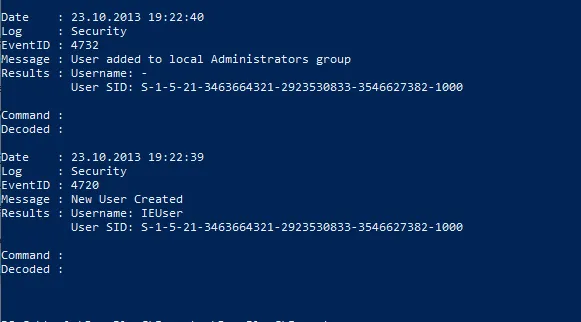
PS C:\tools\DeepBlueCLI-master> Set-ExecutionPolicy unrestrictedSaldırganların ele geçirdikleri sistemlerde yaygın olarak kullandıkları yöntemlerden bir tanesi de sistemlere kullanıcı eklemektir. Bu sayede sistemlere zararlı yazılımlarla sağlamayacakları bir kalıcılık sağlamaktadır.
Şimdi yeni bir kullanıcı eklemek için .evtx dosyalarını bir kontrol edelim.
C:\tools\DeepBlueCLI-master>.\DeepBlue.ps1 .\evtx\new-user-security.evtx
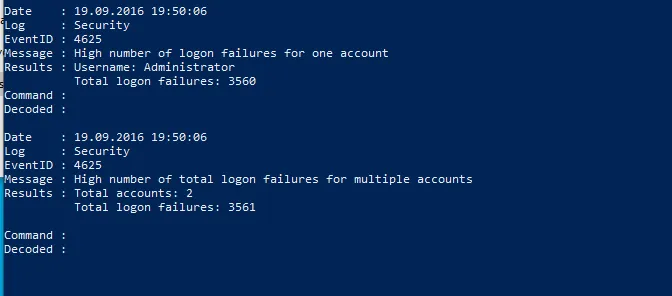
Çok az SIEM tarafından tespit edilen diğer bir saldırı ise parola püskürtmedir. Bu kısım, bir saldırganın bir kullanıcı listesini aldığı ve aynı parolayla püskürttüğü yerdir.
Şimdi buna benzer içerikte olan bir olay günlüğünü inceleyelim.
PS C:\tools\DeepBlueCLI-master>.\DeepBlue.ps1 .\evtx\smb-password-guessing-security.evtx
Parola püskürtme saldırısını tespit etmek içi kullanılan diğer bir komut ise aşağıdaki gibidir.
PS C:\tools\DeepBlueCLI-master>.\DeepBlue.ps1 .\evtx\password-spray.evtx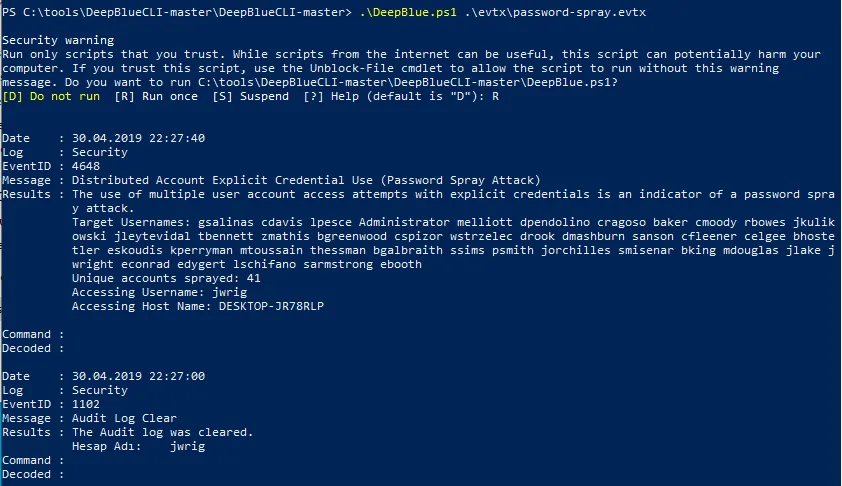
Saldırganlar imza algılamayı atlatmak için kullandıkları kodlama teknikleri çok yaygındır.
DeepBlueCLI’nin saldırganların saldırılarını gizlemek için kullandıkları çeşitli kodlama taktiklerini nasıl algıladığını tespit etmeye çalışalım.
PS C:\tools\DeepBlueCLI-master>.\DeepBlue.ps1 .\evtx\Powershell-Invoke-Obfuscation-encoding-menu.evtx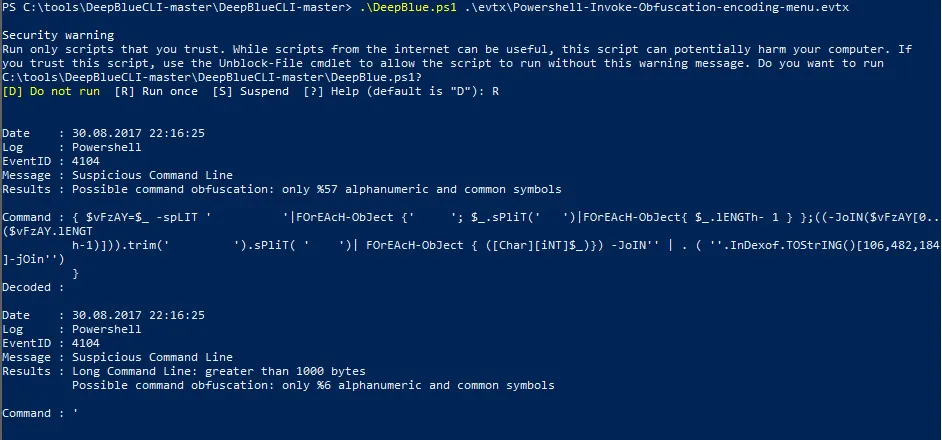
Olay günlüğünü manipüle etmek için;
.\DeepBlue.ps1 .\evtx\disablestop-eventlog.evtx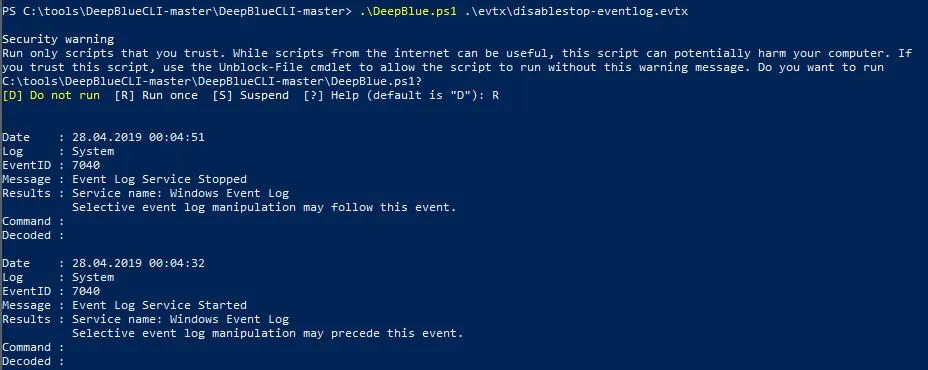
Metasploit yerel hedefi (güvenlik);
.\DeepBlue.ps1 .\evtx\metasploit-psexec-native-target-security.evtx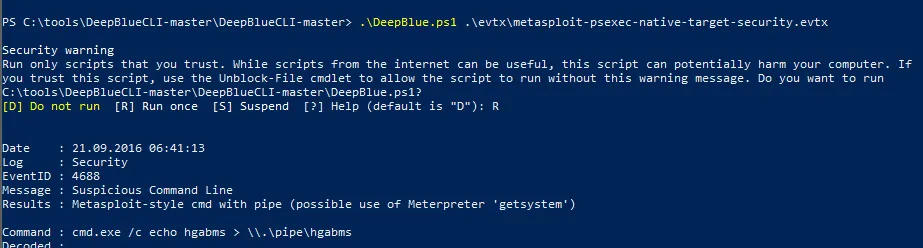
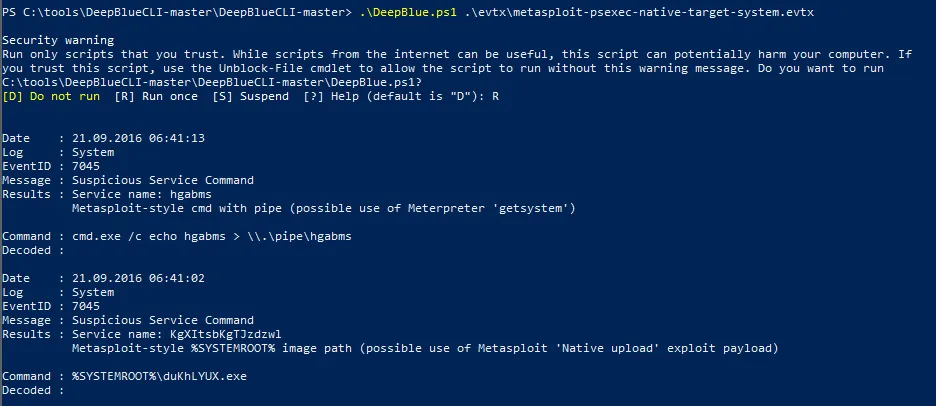
Metasploit yerel hedefi (sistem);
.\DeepBlue.ps1 .\evtx\metasploit-psexec-native-target-system.evtx
DeepBlueCLI, PowerShell nesneleri için JSON, HTML, CSV vb. dahil olmak üzere çeşitli çıktı yöntemlerine ve türlerine izin verir
Bunlar arasında en bilinenlerinden bir tanesi de GridView’dir.
.\DeepBlue.ps1 .\evtx\psattack-security.evtx | Out-GridView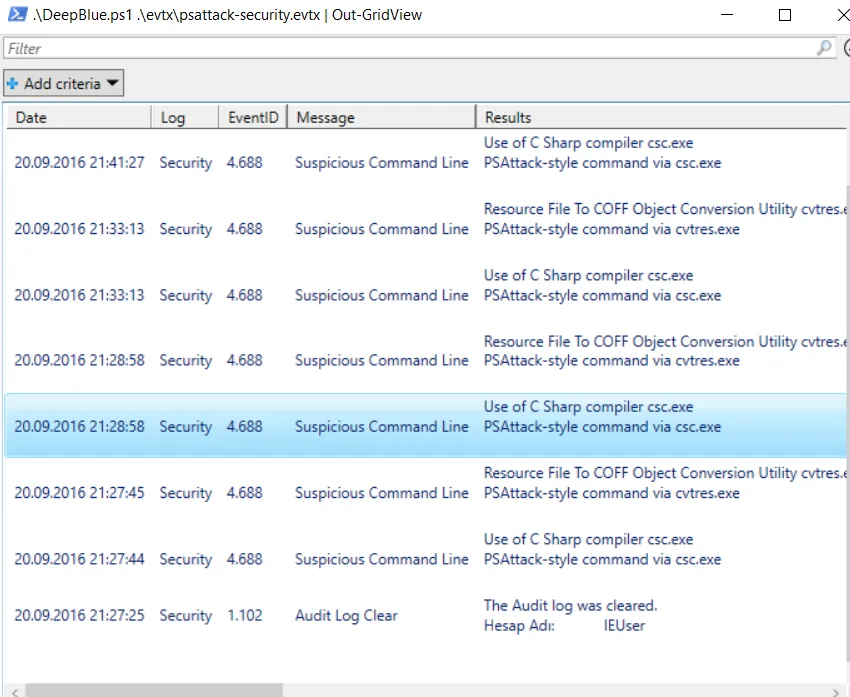
Diğer Olay Komutları
| Event | Command |
|---|---|
| Event log manipulation | .\DeepBlue.ps1 .\evtx\disablestop-eventlog.evtx |
| Metasploit native target (security) | .\DeepBlue.ps1 .\evtx\metasploit-psexec-native-target-security.evtx |
| Metasploit native target (system) | .\DeepBlue.ps1 .\evtx\metasploit-psexec-native-target-system.evtx |
| Metasploit PowerShell target (security) | .\DeepBlue.ps1 .\evtx\metasploit-psexec-powershell-target-security.evtx |
| Metasploit PowerShell target (system) | .\DeepBlue.ps1 .\evtx\metasploit-psexec-powershell-target-system.evtx |
Mimikatz lsadump::sam |
.\DeepBlue.ps1 .\evtx\mimikatz-privesc-hashdump.evtx |
| New user creation | .\DeepBlue.ps1 .\evtx\new-user-security.evtx |
| Obfuscation (encoding) | .\DeepBlue.ps1 .\evtx\Powershell-Invoke-Obfuscation-encoding-menu.evtx |
| Obfuscation (string) | .\DeepBlue.ps1 .\evtx\Powershell-Invoke-Obfuscation-string-menu.evtx |
| Password guessing | .\DeepBlue.ps1 .\evtx\smb-password-guessing-security.evtx |
| Password spraying | .\DeepBlue.ps1 .\evtx\password-spray.evtx |
| PowerSploit (security) | .\DeepBlue.ps1 .\evtx\powersploit-security.evtx |
| PowerSploit (system) | .\DeepBlue.ps1 .\evtx\powersploit-system.evtx |
| PSAttack | .\DeepBlue.ps1 .\evtx\psattack-security.evtx |
| User added to administrator group | .\DeepBlue.ps1 .\evtx\new-user-security.evtx |
Çıktı Formatları
| Output Type | Syntax |
|---|---|
| CSV | `.\DeepBlue.ps1 .\evtx\psattack-security.evtx |
| Format list (default) | `.\DeepBlue.ps1 .\evtx\psattack-security.evtx |
| Format table | `.\DeepBlue.ps1 .\evtx\psattack-security.evtx |
| GridView | `.\DeepBlue.ps1 .\evtx\psattack-security.evtx |
| HTML | `.\DeepBlue.ps1 .\evtx\psattack-security.evtx |
| JSON | `.\DeepBlue.ps1 .\evtx\psattack-security.evtx |
| XML | `.\DeepBlue.ps1 .\evtx\psattack-security.evtx |
Buraya kadar okuduğunuz için Teşekkürler. Umarım faydalı olmuştur. :)